Shelly uses the form flow — collect the user's Shelly Cloud auth key and POST it as connection data
A Shelly device's model.category determines its type: smart plugs / relays (e.g. Plug S, 1PM, 2PM) are switch and controllable via on-off; EM / 3EM energy meters (e.g. Shelly EM, 3EM, Pro 3EM, EM Gen3) are electricMeter and used for metering only (no on-off)
Only the electricMeter (EM / 3EM) variants require measurement-purpose via PUT /devices/{id}/measurement-purpose (gridMeter or pvProduction) — otherwise setup stays incomplete. pvProduction re-creates the device as a producingswitch that reports PV output but is still noton-off-controllable
One Shelly Cloud account = one integrator = one connection. All Shelly devices under that account appear in the device list
Complete flow for connecting Shelly devices via the Connect API.
The Shelly integration uses a "form" flow with a "login" type. This means you'll need to open the provided URL in a browser or WebView for user authentication.
Step 3: Create Connection
Code
POST /v1/users/{userId}/vendors/{vendorId}/connections
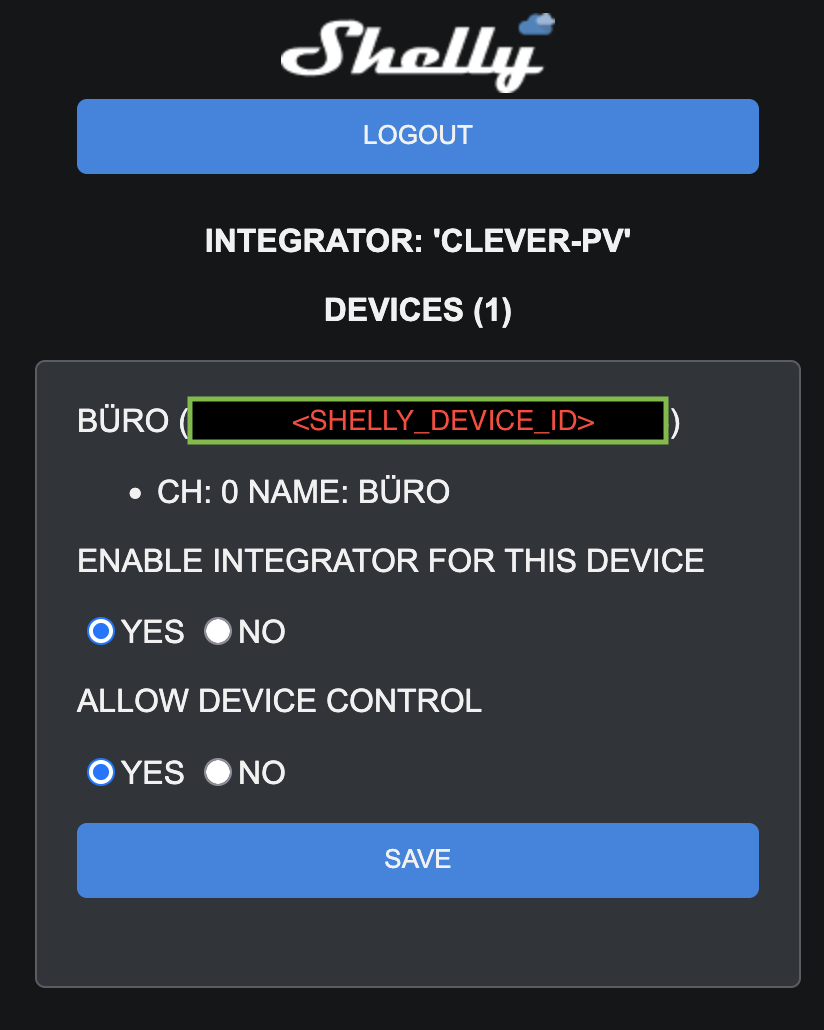
After creating the connection, guide the user through the Shelly integrator:
Open browser/WebView to the URL from Step 2: https://my.shelly.cloud/integrator.html?itg=ITG_CPV1&cb=https%3a%2f%2ffa-cpv-shelly-itg-beta.azurewebsites.net%2fapi%2fShellyIntegrator%3fcode%3d6eUTCK1JBN8PA6khvwwagXb_27G6g0gd9O1raM4wcNEVAzFumTTRvg%3d%3d%26userid%3d76508964-f720-479d-9c6e-5f1c51b1d6bc
User logs in with their Shelly account.
User clicks the device to pair from the device list.
Authorize the integrator on the device-detail screen by performing all three of these actions:
Under the label "ENABLE INTEGRATOR FOR THIS DEVICE", tap the "YES" button.
Under the label "ALLOW DEVICE CONTROL", tap the "YES" button.
Tap the "SAVE" button at the bottom of the screen.
On success, the Shelly UI shows a "Done" alert. The user can close the tab afterwards. The devices are then pushed by Shelly to our backend and will appear in the next step.
Step 5: List Devices from Vendor
Code
GET /v1/users/{userId}/vendors/{vendorId}/devices?connectionId={connectionId}